
Overview of iBook G4
The iBook G4 is a portable computer for the consumer and education markets. This chapter lists the computer’s features, with emphasis on the changes from the previous models.
In this section:
New Features
All Features
Appearance
Peripheral Devices
System Software
New Features
The features that have changed are listed here along with references to the sections that describe them.
Processor speed: The clock speed of the Power PC G4 microprocessor is 800 MHz, 933 MHz, or 1 GHz. See “PowerPC G4 Microprocessor.”
System bus: The maximum speed of the system bus is 133 MHz, with a variable-speed bus slewing option.
Bus slewing: This feature automatically adjusts the processor and bus speed to conserve battery power. For more information, see “Power Management.”
System RAM: The computer comes with 128 MB of soldered down RAM; some configurations have an additional 128 MB offboard RAM. The expansion slot capacity is an additional 128, 256, or 512 MB, supporting a maximum of 640 MB. For more information, see “RAM Expansion.”
Graphics IC: The display controller is an ATI Mobility Radeon 9200 with 32 MB of graphics DDR SDRAM. See “Graphics IC.”
Battery: The computer has one battery bay. The 50 watt-hour battery in the 12.1-inch display models uses six lithium ion cells and provides up to 6 hours of operation, depending on configuration and usage. The 61 watt-hour battery in the 14.1-inch display model uses eight lithium ion cells and provides up to 6 hours of operation, depending on configuration and usage.
USB 2.0 ports: The computer has two external USB 2.0 ports. See “USB Ports.”
AirPort Extreme Card: An AirPort Extreme Card is available as a build-to-order option or as a user-installable upgrade. See “AirPort Extreme.”
Bluetooth: Available as a build-to-order option, fully-integrated Bluetooth enables short-range wireless connections between desktop and laptop computers and a host of other peripheral devices. For more information, see “Bluetooth Technology.”
Hard disk storage: Depending on the configuration, the iBook G4 has a hard disk drive with a storage capacity of 30 GB, 40 GB, or 60 GB. For more information and developer guidelines for alternative hard drives, see “Hard Disk Drive.”
CD-ROM drive: Some configurations of the computer have a built-in, slot-loading, 24x-speed CD-ROM drive. See “CD-ROM Drive.”
Combination DVD-ROM/CD-RW drive: Some configurations of the computer have a built-in, slot-loading, combination DVD-ROM/CD-RW drive. For more information, see “DVD-ROM/CD-RW Combo Drive.”
Weight: With the battery installed, the 12.1-inch display models weigh approximately 2.2 kg (4.9 pounds) and the 14-1-inch display model weighs approximately 2.6 kg (5.9 pounds). The exact weight depends on the configuration.
Size: The 12.1-inch display models are 28.50 cm (11.2 inches) wide, depth 23.03 cm (9.06 inches) deep, and 3.42 cm (1.35 inches) thick. The 14.1-inch display model is 32.3 cm (12.7 inches) wide, 25.8 cm (10.2 inches) deep, and 3.42 cm (1.35 inches) thick.
All Features
Here is a list of the features of the iBook G4. Each feature is described in a later chapter, as indicated in the list.
Processor speed: The clock speed of the Power PC G4 microprocessor is 800 MHz, 933 MHz, or 1 GHz. See “PowerPC G4 Microprocessor.”
System bus: The maximum speed of the system bus is 133 MHz, with a variable-speed bus slewing option.
Bus slewing: This feature automatically adjusts the processor and bus speed to conserve battery power. For more information, see “Power Management.”
Cache: The microprocessor has a built-in L2 cache consisting of 256 KB of fast static RAM. The clock speed for the backside cache is the same as the clock speed of the microprocessor. See “L2 Cache.”
System RAM: The computer comes with 128 MB of soldered down RAM; some configurations have an additional 128 MB offboard RAM.The expansion slot capacity is an additional 128, 256, or 512 MB, supporting a maximum of 640 MB. For more information, see “RAM Expansion.”
Hard disk storage: Depending on the configuration, the iBook G4 has a hard disk drive with a storage capacity of 30 GB, 40 GB, or 60 GB. For more information and developer guidelines for alternative hard drives, see “Hard Disk Drive.”
CD-ROM drive: Some configurations of the computer have a built-in, slot-loading, 24x-speed CD-ROM drive. See “CD-ROM Drive.”
Combination DVD-ROM/CD-RW drive: Some configurations of the computer have a built-in, slot-loading, combination DVD-ROM/CD-RW drive. For more information, see “DVD-ROM/CD-RW Combo Drive.”
Display: Two TFT display sizes are available: a 12.1-inch and a 14.1-inch. Both displays have XGA (1024x768) resolution. See “Flat Panel Display.”
External display connector: The external display connector supports VGA, composite, and S-video formats for devices such as monitors and projectors. See “External Display Port.”
Graphics IC: The display controller is an ATI Mobility Radeon 9200 with 32 MB of graphics DDR SDRAM. See “Graphics IC.”
Microphone: The computer has a built-in microphone. See “Sound System.”
Battery: The computer has one battery bay. The 50 watt-hour battery in the 12.1-inch display models uses six lithium ion cells and provides up to 6 hours of operation, depending on configuration and usage. The The 61 watt-hour battery in the 14.1-inch display model uses eight lithium ion cells and provides up to 6 hours of operation, depending on configuration and usage.
USB 2.0 ports: The computer has two external USB 2.0 ports. See “USB Ports.”
FireWire 400 port: The computer has an IEEE-1394a FireWire 400 high-speed serial port. See “FireWire 400 Port.”
Target disk mode: The computer can act like a FireWire storage device connected to another computer. See “Target Disk Mode.”
Modem: The computer has a built-in modem that supports 56 Kbps data rate with V.92 modem standards. See “Internal Modem.”
Ethernet: The computer has a built in Ethernet port for 10Base-T and 100Base-T operation. See “Ethernet Port.”
AirPort Extreme Card: An AirPort Extreme Card is available as a build-to-order option or as a user-installable upgrade. See “AirPort Extreme.”
Bluetooth: Available as a build-to-order option, fully-integrated Bluetooth enables short-range wireless connections between desktop and laptop computers and a host of other peripheral devices. For more information, see “Bluetooth Technology.”
Sound: The computer has a built-in microphone and stereo speakers; it provides stereo output signals on the audio minijack. See “Sound System.”
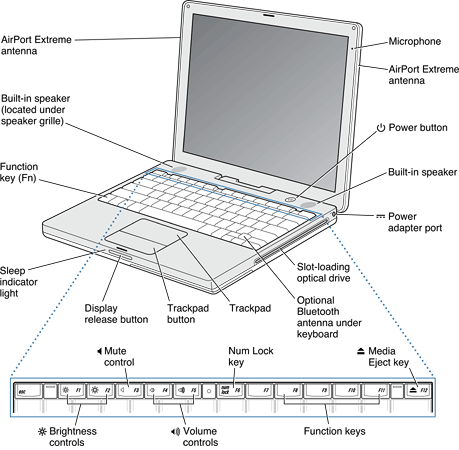
Keyboard: The keyboard has function keys and inverted-T arrow keys. Some of the function keys are used to control the brightness and sound and to eject a disk. The keyboard also includes an embedded numeric keypad. See “Keyboard.”
Trackpad: The integrated trackpad includes tap/double tap and drag features. See “Trackpad.”
Weight: With the battery installed, the 12.1-inch display models weigh approximately 2.2 kg (4.9 pounds) and the 14-1-inch display model weighs approximately 2.6 kg (5.9 pounds). The exact weight depends on the configuration.
Size: The 12.1-inch display models are 28.50 cm (11.2 inches) wide, depth 23.03 cm (9.06 inches) deep, and 3.42 cm (1.35 inches) thick. The 14.1-inch display model is 32.3 cm (12.7 inches) wide, 25.8 cm (10.2 inches) deep, and 3.42 cm (1.35 inches) thick.
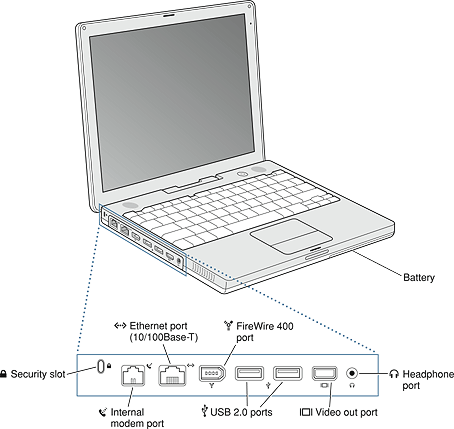
Security slot: The iBook G4 has a slot for attaching a Kensington security cable.
Appearance
Figure 1-1 is a front view of the iBook G4; Figure 1-2 provides a side view showing the I/O ports.
Peripheral Devices
In addition to the devices that are included with the computer, several peripheral devices are available separately:
The AirPort Extreme Card wireless LAN module is available separately as a user-installable option.
The battery is available separately as an additional or replacement battery.
The power adapter, which comes with the computer, is also available separately. The adapter can recharge the internal battery in less than six hours while the computer is running or in three and a half hours while the computer is shut down or in sleep mode.
A video adapter with composite and S-video connectors is available separately.
A VGA adapter with a 15-pin VGA connector, included with the computer, is also available separately.
Additional Apple Memory Module SO-DIMM SDRAM memory cards are available.
System Software
The iBook G4 comes with Mac OS X v. 10.3 installed as the default system and runs Mac OS 9 applications in Classic mode. For more information about Mac OS X, see the reference listed in “Mac OS X.”
Machine Identification
Current and recent Macintosh ROMs share the same BoxFlag. The intent is for applications to use properties in the Open Firmware device tree rather than checking BoxFlag to find out the features of the machine. On all these machines, a call to gestaltMachineType returns the value 406 ($196).
Asset management software that reports the kind of machine it is run on can obtain the value of the property at Devices:device-tree:compatible in the name registry. The model string is the first program-usable string in the array of C strings in the compatible field. For the iBook G4, the model property value is PowerBook6,3.
The string obtained from the compatible property cannot be displayed to the computer user. If available, use the result from calling Gestalt ('mnam', &result), where result is a string pointer. This call returns a Pascal style string that can be displayed to the user.
Applications should not use either of these results to infer the presence of certain features; instead, applications should use Gestalt calls to test for the features they require.
Power Management
Apple’s power management techniques for the iBook G4 are described in the following paragraphs.
Operating States
The power management protocols on the iBook G4 support two power-saving states: idle and sleep.
Idle: The system is idling with the main processor stopped in a halted, low-power state. All clocks are running; the system can return to running code within a few nanoseconds. Cache coherency is maintained in this state.
Sleep: The system is completely shut down, with only the DRAM state preserved for quick recovery. All processors are powered off with their state preserved in DRAM. All clocks in the system are suspended except for the 32.768 kHz timebase crystal on the PMU99 IC.
The computer automatically enters idle state after several seconds of inactivity. If the computer is attached to a network, it is able to respond to service requests and other events directed to the computer while it is in idle state.
While it is connected to an AC power supply, the computer can also respond to network activity when it is in sleep state. The user can enable this feature by selecting Wake-on-LAN in the Energy Saver panel in System Preferences.
When operating on the battery in sleep state, the computer consumes less than 1 watt of power, meeting the Energy Star power-saving standard. When operating on the power adapter in sleep state, the combined computer and adapter consume 3 to 4 watts of power.
Processor and Bus Slewing
To lower power consumption and heat generation, the iBook G4 incorporates an automatic power management technique called bus slewing. Bus slewing is designed to run at high processor speed, bus speeds, and voltage when the demand on the processor is high, and to run at low processor speed, bus speeds, and voltage when the demand on the processor is low. Switching between different processor/bus speeds and voltages is achieved by a transition that operates seamlessly to the user and should not impact system or application performance.
The iBook G4 allows the user to control bus slewing mode. The options for specifying either high, reduced, or automatic processor and bus speeds are located at System Preferences>Energy Saver>Show Details>Options>Processor Performance; then select Automatic, Highest, or Reduced. Slewing is enabled with the automatic setting, which is the system default.
If the iBook G4 detects a system temperature that is too high, due to high ambient temperatures or other factors, it will automatically force the system to slew to reduced mode regardless of the selected setting.
When the iBook G4 is in slewing mode, the processor, processor bus, and memory bus dynamically adjust their speeds based on the current needs of the system. In the 1.0 GHz configuration, the processor speed will switch between 1 GHz and 765 MHz. In the 933 MHz configuration, the processor speed will switch between 933 MHz and 714 MHz. In the 800 MHz configuration, the processor speed will switch between 800 MHz and 612 MHz. In all configurations, the processor bus and memory bus will switch between 133 MHz and 102 MHz.
Target Disk Mode
The user has the option at boot time to put the iBook G4 into a mode of operation called target disk mode (TDM). When the iBook G4 is in target disk mode and connected to another Macintosh computer by a FireWire cable, the iBook G4 operates like a FireWire mass storage device with the SBP-2 (Serial Bus Protocol) standard. Target disk mode has two primary uses:
data transfer between computers
diagnosis and repair of a corrupted internal hard drive
The iBook G4 can operate in target disk mode as long as the other computer has a FireWire port and either Mac OS X (any version) or Mac OS 9 with FireWire software version 2.3.3 or later.
To put the iBook G4 into target disk mode, restart the computer and hold down the T key until the FireWire icon appears on the display. Then connect a FireWire cable from the iBook G4 to the other computer. When the other computer completes the FireWire connection, a hard disk icon appears on its desktop.
If the iBook G4 is turned off or the FireWire cable is disconnected while in target disk mode, an alert appears on the other computer. Disconnecting while the disk is in use can cause loss of data on the target disk.
To dismount the iBook G4 out of target disk mode, drag the hard disk icon of the targeted computer to the trash on the main computer. When the computer is fully dismounted, press the power button on the targeted computer.
Note: When serving as host in target disk mode, the iBook G4 runs at reduced bus speed, as described in “Processor and Bus Slewing.”
© 2003 Apple Computer, Inc. All Rights Reserved. (Last updated: 2003-10-23)