PATH ADC Home > Documentation > Hardware
> iBook Developer Note ADC Home > Documentation > Hardware
> iBook Developer Note
|


The FireWire connector has six contacts, as shown in Figure 3-2. The connector pin assignments are shown in Table 3-2.
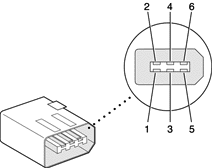
When the computer is on, the power pin provides a maximum voltage of 12.6 V (no load) and up to 7 W peak power. The power is shared with the USB port, which can use up to 2.5 W. The power available for FireWire is reduced by the power consumed by the USB ports.
Note
The maximum voltage on the FireWire power pin on the current iBook computer is lower than that of the previous model.
Pin 2 of the 6-pin FireWire connector is ground for both power and the inner cable shield. If a 4-pin connector is used on the other end of the FireWire cable, its shell should be connected to the wire from pin 2.
The signal pairs are crossed in the cable itself so that pins 5 and 6 at one end of the cable connect with pins 3 and 4 at the other end. When transmitting, pins 3 and 4 carry data and pins 5 and 6 carry clock; when receiving, the reverse is true.